Copilot Reinvented: Home, Code, and Autopilot, the Agent That Works Without You
Microsoft is turning Copilot into a full workspace, where you chat, delegate, code, and let an autonomous agent run in the background, with a bill that starts to fluctuate.
In brief
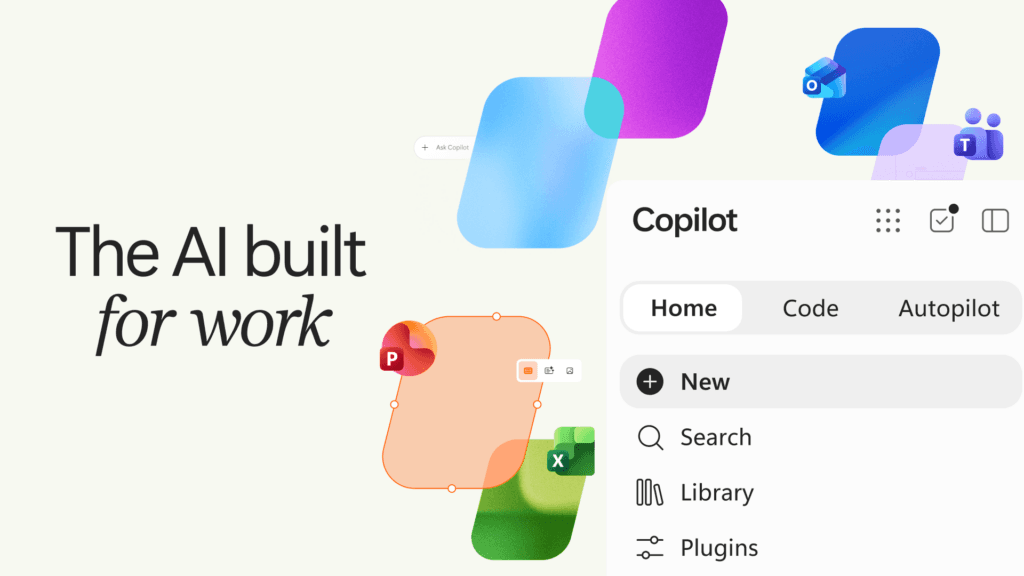
Microsoft is rebuilding the Copilot app around three pillars: Home, which merges Chat, Cowork, and Office, Code, which lets any employee build their own apps, and Autopilot, a persistent agent that works in the background. Behind the product announcement lies a shift in business model: agentic AI is moving to usage-based billing, paired with FinOps tools to keep costs in check.
🍺 Bar-stool version
Microsoft looked at your Monday morning and decided the problem was that you were still there. So now Copilot writes your documents, codes your little apps, and, with Autopilot, chases up your colleagues while you sleep, complete with a name, a role, and even its own computer, which is more than the last intern ever got. The detail that actually matters is tucked at the bottom of the page: everything that really works gets metered, like a taxi running while you're in bed. AI at the office stops being a subscription and starts being a line item you have to watch.
Key takeaways
- 1
The Copilot app is now organized around three capabilities: Home (Chat + Cowork + Office), Code (app creation in natural language), and Autopilot (a persistent, proactive agent).
- 2
Cowork handles fully delegated tasks end to end, like an RFP response, a launch kit, or a financial close package. Eventually, Copilot will itself decide between Chat, Cowork, and Code.
- 3
Code runs on the same technology as GitHub Copilot. It runs in a sandbox and can be hosted in the company's tenant via the new Copilot Managed Runtime.
- 4
Autopilot, formerly Scout, has its own identity, memory, computer, and workspace. You mention it with @ in Teams or Outlook, just like a colleague.
- 5
Fabric IQ feeds Copilot the context of more than 20 million Power BI semantic models. Dynamics 365 and Power Platform are entering public preview.
- 6
Billing splits into two tracks: a fixed-cost per-user license (USL) for everyday AI, and usage-based billing (UBB) for Cowork, Code, Autopilot, and the frontier models Astra and Fable.
- 7
New FinOps for AI tools in Agent 365 let admins set spending policies, restrict model families by user group, and show employees their own credit consumption.
Home: a single entry point, with Office built in
Home becomes Copilot's landing page. It brings together Chat, for quick questions and drafts, and Cowork, for delegated work that runs end to end into a finished deliverable. Recent activity and suggestions show up there too, so you pick up work right where you left off.
Microsoft promises that soon you won't need to choose a mode at all. You'll simply state the goal, and Copilot will route the request to Chat, Cowork, or Code.
With Office in Copilot, Word, Excel, and PowerPoint are woven into the experience. Copilot creates or edits real, editable files, shared live with the team and synced with the Office apps. PowerPoint automatically applies brand guidelines, Excel shows what changed and why, and business Skills (finance in Excel, legal in Word) standardize best practices.
Code: the app becomes just another unit of work
Microsoft's thesis is explicit. After the document, the spreadsheet, and the presentation, the custom-built small app becomes the fourth unit of office work. Knowing how to build one is expected to soon be as ordinary as writing a memo.
You describe an app, a tracker, a dashboard, or an automation in natural language, and Copilot picks the approach: a persistent desktop widget, an interactive dashboard, or an internal app hosted in the cloud.
Code is built on GitHub Copilot's technology, runs in a sandbox, and is grounded in company context via Microsoft IQ. Developers keep GitHub Copilot. Rollout starts within the Frontier program, ahead of a preview for Microsoft 365 Premium and Pro subscribers later this year.
To host these creations, Microsoft is launching Copilot Managed Runtime, infrastructure that executes code within the company's own Microsoft 365 environment, under IT governance. It's in preview and open to third-party developers.
Autopilot: a digital colleague that never logs off
Autopilot, formerly Scout, is an agent you give a name, a role, and a goal. It watches channels, follows up on threads, runs recurring tasks, and picks a project back up days later, without waiting for a prompt.
Microsoft cites the example of a full vendor review: Autopilot builds the schedule, prepares meetings, follows up, and reaches out to stakeholders on its own. Hosted in the cloud, it keeps working while the user sleeps.
The agent lives in the tenant with its own identity, memory, computer, and workspace, subject to permissions, auditing, and governance. It enters private preview by the end of the month.
More business context, a plugin catalog
Copilot runs on Microsoft IQ, described as the unified intelligence platform linking a company's data and processes. Fabric IQ adds the context of more than 20 million Power BI semantic models. This integration is available today in Chat and Cowork.
Data from Dynamics 365 and Power Platform is entering public preview. A salesperson, for instance, will be able to pull deal history and support tickets straight into a proposal.
A new plugin registry centralizes Microsoft, partner, and in-house plugins into a single catalog. IT approves and manages it centrally, and vendors publish once for all Copilot surfaces.
The bill is changing shape
This is arguably the most structural announcement. The per-user license (USL) covers everyday AI at a fixed cost: Chat, and Copilot in Word, Excel, PowerPoint, Outlook, and Teams. It's built around Auto, a router that balances accuracy, speed, and cost on every request.
All agentic work shifts to usage-based billing (UBB): Cowork, Code, Autopilot, and the frontier models named Astra and Fable. Microsoft justifies this by the freedom to select a model and align cost with value.
To support this shift, the FinOps for AI tools in Agent 365 are expanding to Code and the Managed Runtime, and to Copilot Studio in October. On the menu: spending policies via API, approval workflows for credit requests, restricting model families by group (which also limits Auto's choices), and consumption dashboards for every user.
What's next: Today and @Copilot in Teams
Today, expected in Home, will be a proactive command center covering email, calendar, Teams, meetings, and tasks. It won't just flag things: it will draft messages, propose schedule changes, and prepare follow-ups ready to send. Private preview in October, then rolling out to Outlook and Teams.
In Teams, @Copilot will share the context and permissions of the channel or meeting with the whole team. It will also be able to prepare a cross-team review with dependencies, owners, and open questions. Private preview by the end of the month, ahead of further announcements at Ignite, November 17-20 in San Francisco.
“Autopilot is a persistent, proactive and personal agent that keeps working even when you're not.”
“Learning to build them is becoming as basic a skill as writing a memo or modeling a budget.”
“Agentic work requires a different type of spend.”
Why it matters
Microsoft is no longer just bolting an assistant onto Office. It's repositioning Copilot as the primary layer of the workstation, sitting above the apps, and populating it with agents that have an identity, a memory, and a computer of their own. This is a direct response to the rise of autonomous agents and 'vibe coding' tools, with an advantage few rivals have: deep grounding in the tenant, the data, and the governance already in place at enterprise customers. But the real story is economic. By reserving agentic work for usage-based billing, Microsoft is admitting that running agents is expensive, and it's shifting that risk onto the customer. Hence the FinOps arsenal shipped alongside it, an implicit admission that costs could spiral. Several questions remain open: how reliable is an agent that follows up with stakeholders unsupervised, what happens when non-developers flood companies with internal apps, and the fact that almost everything is still in preview or restricted to the Frontier program. The pitch is ambitious; the proof will come with actual rollouts.
For you
Put it to work on your sources.
Free: this week's articles and three sources of your own. Pro: the whole archive and your sources, from €8/month.
For your team
The same machine, on your topics.
A space in your colours, your watch angles, your curators. Pilot open to three companies.
Read next
Meta Connect 2026: Muse, the Agent That Wants Its Cut of Your Life
Zuckerberg unveiled a personal agent, glasses that double as hearing aids, 100-gram VR glasses, and an AI keychain, all wrapped in the same promise of "personal superintelligence" at every level.
Source · Meta Developers (YouTube) · Meta Connect 2026: Opening Keynote
 #googleToday
Gemini 3.8 Live Gets a Face: Google Launches Live Avatar
After voice, Google is giving its conversational agents a video avatar synced in near real-time, designed for enterprise customer service.
Source · Blog de Google (The Keyword) · Introducing Gemini 3.8 Live with Live Avatar
 #privacyYesterday
Meta AI Glasses: Confidential Cloud for an AI That Sees Everything
Meta is extending its Private Processing infrastructure to its connected glasses, with a bold promise: even Meta won't be able to read what your glasses send to its data centers.
Source · Engineering at Meta · Bringing Private Processing to Meta AI Glasses